Frequently asked questions about Trigger Scan™
Q: Can I use the TriggerScan instrument without a personal computer?
A: Yes, the instrument has its own microprocessor and functions independently. The only disadvantage of not using the personal computer would be that you could not see, analyze, or print the graphs, but you could still see the results of peak force and lock time on the instrument’s LED panel.
Q: I plan to use the instrument with a personal computer. What are the device requirements?
A: You will need a PC or laptop with a 486/50 or better CPU, which runs Microsoft® Windows 3.1, Windows 95, Windows NT, or above. The software takes up only about 1 Megabyte of your hard drive space. One standard RS-232 serial port is needed to connect to the instrument. The cable is provided.
Q: What are the power requirements of the instrument?
A: The instrument comes with a universal power adapter which requires anywhere between 100 and 240 VAC and 50 to 60 Hz at 0.3 A. This adapter provides 18 VDC at 650 mA for the instrument.
Q: Why do you say that TriggerScan sets a new global standard for trigger testing?
A: Unlike other trigger gages, TriggerScan not only measures the force on the trigger but also the displacement (travel). It further combines the readings of force and travel and determines the amount of work needed to actuate the trigger. This value, previously unmeasurable is of extreme importance in quantifying "what it takes" to fire the gun, and is directly related to the gun’s safety of operation. TriggerScan is also the only system providing accurate and affordable means of measuring lock time.
Q: How is the graph (Trigger Profile) created?
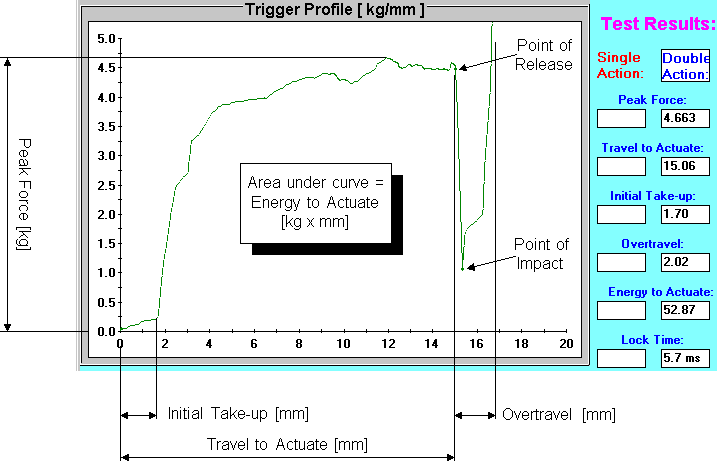
A: Datapoints are put on the chart after the moving sensor arm came in contact with the trigger and the force exceeded a threshold value (user selectable). A new datapoint is generated every 0.0005" of movement, which corresponds to 3.2 milliseconds of time. This high resolution and sampling rate allows you to see even the slightest glitches on the trigger’s journey, and to study the trigger’s roughness/smoothness. Other commercial compression testing machines generally do not have this high resolution and therefore are not capable of revealing the roughness/smoothness of a trigger: trigger profile is under-sampled, imperfections remain hidden and appear as a smooth line. TriggerScan has ample bandwidth for trigger testing: even triggers with travel as short as 0.008" can be reliably measured with TriggerScan.
Q: How can you measure lock time with a 0.1 ms resolution when datapoints are 3.2 ms apart?
A: The instrument is sampling the force at a frequency much higher than what is put on the chart. The moment of trigger actuation appears as a sudden drop in the force on the trigger and is very accurately detected by the internal logic of the instrument. The moment of striker impact is detected by electrical probe that slides down the barrel. This method of measuring lock time is proprietary to Dvorak Instruments. The user can study the events of trigger release and striker impact graphically by opening another chart from the main menu. This chart shows in detail how the force on the trigger was changing during the last 14 milliseconds before striker impact. It is useful in analyzing whether the trigger let-off suddenly or gradually, and in determining the lock time.
Q: Is a fixture required to support the gun during the test?
A: Not necessarily. You can perform a quick test by holding the instrument and the gun manually. However, based on our experience, we strongly suggest that you locate the instrument and the gun in a fixture during the test in order to get the best repeatability of measurement. Two different fixtures are available at this time. A good fixture is especially important when testing sensitive triggers with short travel.
Q: What is the difference between the Basic Rest and the Professional Rest?
A: Both of these fixtures are designed to accommodate any handguns or rifles. The basic rest is faster to set up, and provides good stability during the test. With guns that do not have a flat base, manual support is usually helpful during the test. The professional rest has more adjustments and a spring loaded clamp which holds the gun in place. Once it is set up for a particular gun, the gun can be removed and placed back into the fixture very quickly while maintaining the same position, which assures good repeatability of measurement. Manual support is not needed.
Q: Can I use the TriggerScan on a shotgun or an assault rifle such as M16?
A: Yes, trigger profiles can be measured on these types of guns. The only gun where you might have a little trouble is a derringer. On guns without a trigger guard, you would have to find an alternative way to fix the instrument during the test cycle. If you plan to measure lock time on a shotgun, the present striker sensor has a diameter of 0.25", so you will need to find an improvised bushing to keep the sensor aligned with the barrel’s center line. The striker sensor will not fit a .22 cal. bore so you can not test lock time on the M16 with this particular sensor. We plan to have striker sensors for various calibers available in the near future. In the meantime you can probably find an easy way to improvise.
Q: How many test options exist?
A: There are currently two separate test options: Triggers or Springs.
The test sequence is basically the same for both options and traces on the chart are displayed in the same fashion. The difference is that when you analyze a trigger profile, the software automatically evaluates: Peak force, Travel to actuate, Initial take-up, Overtravel and Energy to actuate. When analyzing a spring test, the software automatically evaluates: Stiffness and Energy stored in the spring when compressed by a predetermined distance.
Q: Can the test results be saved to a data file?
A: Yes, you can easily save a trigger test in a filename of your choice. Each saved file stores up to two traces (SA and DA), Gun type, Make, Model, Serial number, Trigger type and a Note. Files are saved with a default extension ".trg" and the DOS environment stamps them with the date and time you created them. Size of a trigger file depends on how long the trigger travel was and if you tested both SA and DA or just one. An average trigger file will take up about 14 Kbytes, which means that you can fit about a 100 of these on a floppy diskette or 100,000 of them on your 1.5 GB hard drive.
Q: Is it possible to include annotations on the printouts?
A: Yes, the printout will include everything that appears on the screen including all currently shown profiles (up to 11 at a time), and Gun type, Make, Model, Serial number, Trigger type and a Note (user typed in) for the selected profile. Every printout is also automatically stamped with the time and date it was printed and with the name of your business, so it becomes a way of advertising your facility.
Q: Can I use the instrument to test release triggers such as found on some trap shotguns?
A: Yes, you can select from the main menu when to put the trace on the chart. Normaly, the trace appears when sensor finger moves "forward". When you select "return" or "both directions", then you can also see the graph as the trigger is being released.
Q: How are these instruments calibrated?
A: Each TriggerScan instrument is calibrated using NIST traceable weights, class F, before shipping. After that, it is the user’s responsibility to maintain the instrument’s calibration. The calibration procedure is clearly written in the user manual. We recommend a calibration check every 3 months or 500 tests, whichever comes first. The actual calibration will not be needed as often, since the circuitry is built from components with ultra-low drift and is very stable. Travel and lock time readings do not require calibration since they are derived by strictly digital means based on the internal quartz crystal clock.
Q: Is there an advantage in using a larger monitor when running the TriggerScan software?
A: Yes the resolution of the Trigger Profile graph improves when you use a larger monitor. The software recognizes the video resolution setting and increases the area of the graph while keeping the control buttons and texts at a comfortable size.
Q: Can I measure anything else with TriggerScan besides triggers and compression springs?
A: Yes, TriggerScan can examine tension or compression characteristics of other items, such as rubber bands, sewing threads, jewelry chains, or fishing lines, as long as they fit within the operating range.
Q: Are the data readings from the system also available in MKS units?
A: Yes, both graphs and numerical results can be viewed in one of four selected unit combinations: pound/inch; ounce/inch; kilogram/millimeter; Newton/millimeter. Unit selection can be changed at any time. Graphs and numbers on the screen are automatically regenerated.
Q: Do you deliver the system with a database of standard trigger profiles from firearms manufacturers?
A: Not at present time, getting this information directly from the firearms manufacturers is a bit optimistic. (At present time, many are still using rather primitive trigger pull gages which are not capable of generating accurate trigger profiles as TriggeScan). However, we plan to build this database ourselves: in the near future, we will start collecting trigger profiles acquired by all TriggerScan users worldwide, who want to participate. This information will be compiled into a central database and re-distributed to all of our clients on regular basis. This database will be searchable using various criteria.
Q: Do you have technical support outside the United States of America?
A: Yes, here is our sales representative in Europe. Please contact us to find out a sales representative in any other specific country.
Mr. Axel Manthei, MMS, Albrecht-Nützel-Weg 29, 86916 Kaufering, GERMANY